Plotting Quantified Data
import xarray as xr
from astropy import units as u

import astropy_xarray  # noqa: F401

# to be able to read unit attributes following the CF conventions
# import cf_xarray.units  # must be imported before astropy_xarray
u.set_enabled_aliases(
    {
        "degK": u.Kelvin,
        "K": u.Kelvin,
        "degrees_north": u.deg,
        "degrees_east": u.deg,
    },
)

xr.set_options(display_expand_data=False)
<xarray.core.options.set_options at 0x78ab32e15150>
load the data
ds = xr.tutorial.open_dataset("air_temperature")
data = ds.air
data
<xarray.DataArray 'air' (time: 2920, lat: 25, lon: 53)> Size: 31MB
[3869000 values with dtype=float64]
Coordinates:
  * lat      (lat) float32 100B 75.0 72.5 70.0 67.5 65.0 ... 22.5 20.0 17.5 15.0
  * lon      (lon) float32 212B 200.0 202.5 205.0 207.5 ... 325.0 327.5 330.0
  * time     (time) datetime64[ns] 23kB 2013-01-01 ... 2014-12-31T18:00:00
Attributes:
    long_name:     4xDaily Air temperature at sigma level 995
    units:         degK
    precision:     2
    GRIB_id:       11
    GRIB_name:     TMP
    var_desc:      Air temperature
    dataset:       NMC Reanalysis
    level_desc:    Surface
    statistic:     Individual Obs
    parent_stat:   Other
actual_range: [185.16 322.1 ]quantify the data
Note: this example uses the data provided by the
xarray.tutorial functions. As such, the units attributes follow the CF conventions, which astropy does not understand by default. To still be able to read them, registry be aliases can be used. For more information, see cf-xarray.
quantified = data.astropy.quantify()
quantified
<xarray.DataArray 'air' (time: 2920, lat: 25, lon: 53)> Size: 31MB
[K] 241.2 242.5 243.5 244.0 244.1 243.9 ... 297.9 297.4 297.2 296.5 296.2 295.7
Coordinates:
  * lat      (lat) float32 100B [°] 75.0 72.5 70.0 67.5 ... 22.5 20.0 17.5 15.0
  * lon      (lon) float32 212B [°] 200.0 202.5 205.0 ... 325.0 327.5 330.0
  * time     (time) datetime64[ns] 23kB 2013-01-01 ... 2014-12-31T18:00:00
Indexes:
    lat      AstropyIndex(PandasIndex)
    lon      AstropyIndex(PandasIndex)
Attributes:
    long_name:     4xDaily Air temperature at sigma level 995
    precision:     2
    GRIB_id:       11
    GRIB_name:     TMP
    var_desc:      Air temperature
    dataset:       NMC Reanalysis
    level_desc:    Surface
    statistic:     Individual Obs
    parent_stat:   Other
actual_range: [185.16 322.1 ]work with the data
monthly_means = quantified.astropy.sel(time="2013").groupby("time.month").mean()
monthly_means
<xarray.DataArray 'air' (month: 12, lat: 25, lon: 53)> Size: 127kB
[K] 244.5 244.7 244.7 244.5 244.2 243.8 ... 298.0 297.9 297.9 297.5 297.4 297.4
Coordinates:
  * lat      (lat) float32 100B [°] 75.0 72.5 70.0 67.5 ... 22.5 20.0 17.5 15.0
  * lon      (lon) float32 212B [°] 200.0 202.5 205.0 ... 325.0 327.5 330.0
  * month    (month) int64 96B 1 2 3 4 5 6 7 8 9 10 11 12
Indexes:
    lat      AstropyIndex(PandasIndex)
    lon      AstropyIndex(PandasIndex)
Attributes:
    long_name:     4xDaily Air temperature at sigma level 995
    precision:     2
    GRIB_id:       11
    GRIB_name:     TMP
    var_desc:      Air temperature
    dataset:       NMC Reanalysis
    level_desc:    Surface
    statistic:     Individual Obs
    parent_stat:   Other
actual_range: [185.16 322.1 ]Most operations will preserve the units but there are some which will drop them (see the duck array integration status page). To work around that there are unit-aware versions on the .astropy accessor. For example, to select data use .astropy.sel instead of .sel:
monthly_means.sel(
    lat=u.Quantity(4350, "arcmin"),
    lon=u.Quantity(12000, "arcmin"),
)
<xarray.DataArray 'air' (month: 12)> Size: 96B
[K] 247.1 241.9 250.7 257.5 267.7 274.8 276.8 273.6 273.0 269.3 258.6 251.7
Coordinates:
    lat      float32 4B [°] np.float32(72.5)
    lon      float32 4B [°] np.float32(200.0)
  * month    (month) int64 96B 1 2 3 4 5 6 7 8 9 10 11 12
Attributes:
    long_name:     4xDaily Air temperature at sigma level 995
    precision:     2
    GRIB_id:       11
    GRIB_name:     TMP
    var_desc:      Air temperature
    dataset:       NMC Reanalysis
    level_desc:    Surface
    statistic:     Individual Obs
    parent_stat:   Other
actual_range: [185.16 322.1 ]plot
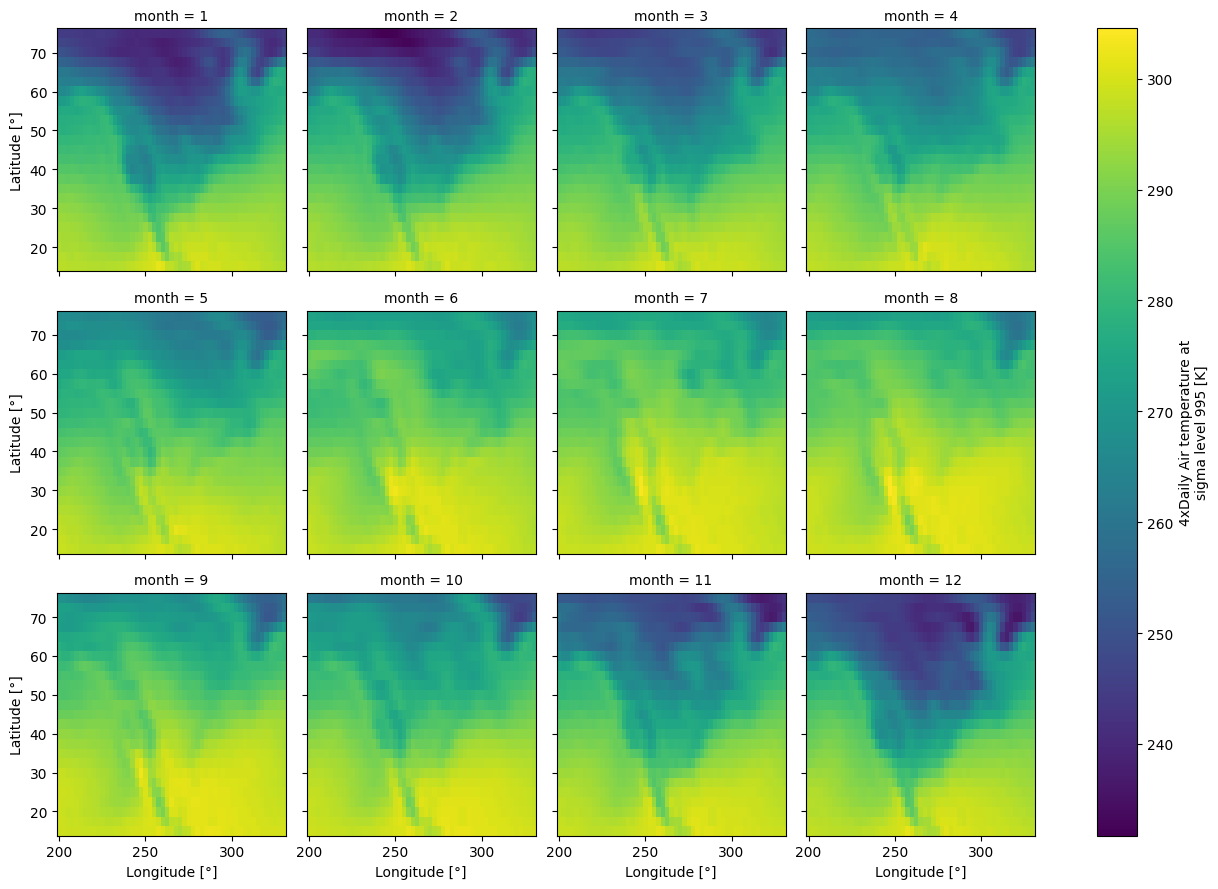
xarray’s plotting functions will cast the data to numpy.ndarray, so we need to “dequantify” first.
monthly_means.astropy.dequantify(format="unicode").plot.imshow(col="month", col_wrap=4)
<xarray.plot.facetgrid.FacetGrid at 0x78ab15eb0990>